01
Context
Most AI trip planners hand you a wall of text and wish you luck.
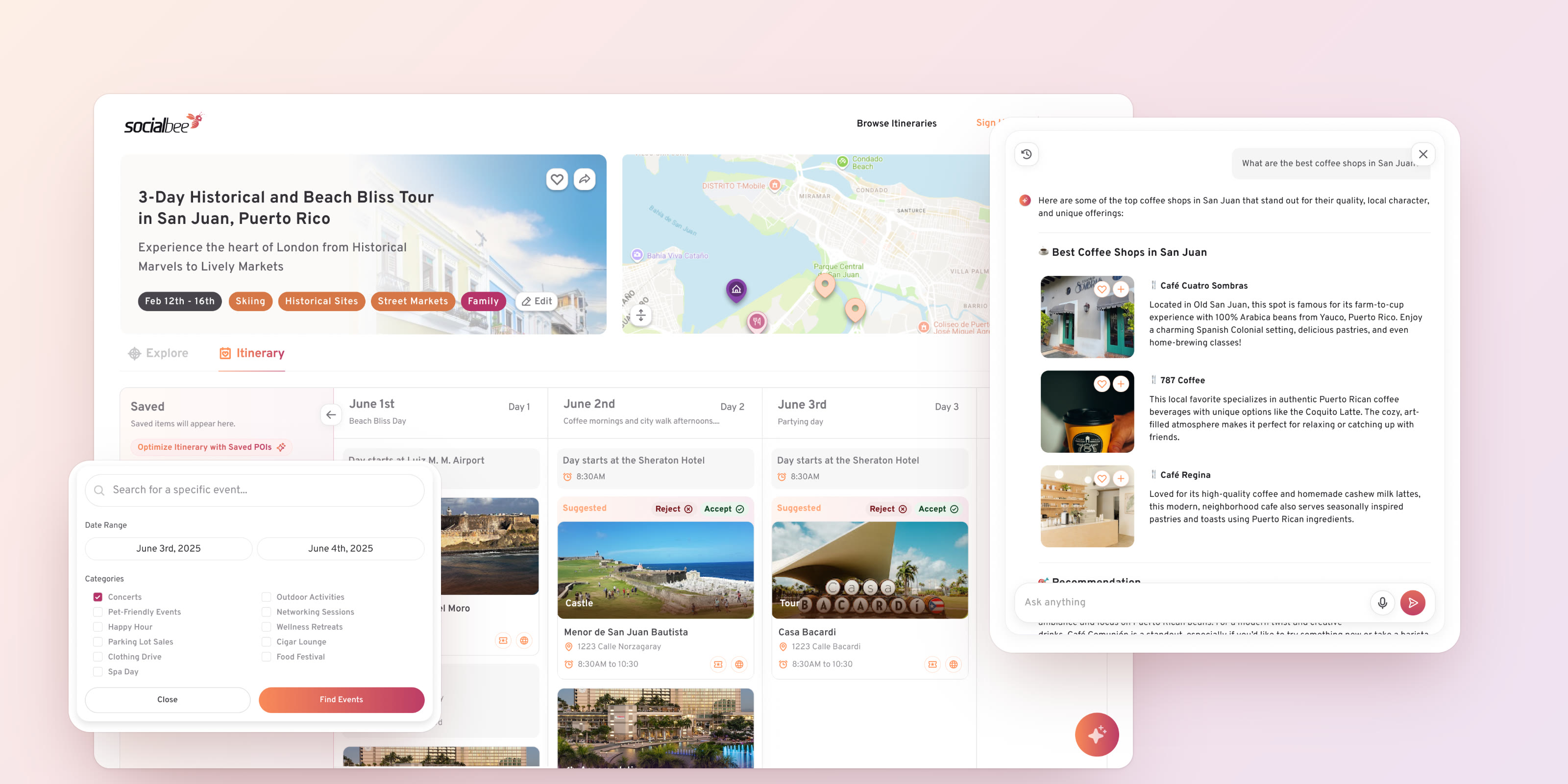
SocialBee plans trips around a single page: what to explore, the itinerary day by day, and a map of where everything is. Version 3.5/4.0 put an AI assistant at the centre of it.
I designed that layer through Layline Design Co.: the chat and its empty state, voice input, rich answers, Write with AI, AI suggestions inside the itinerary, and events surfaced on the map.
02
The problem
Getting the AI to answer was never the hard part. The hard part was making the answer something you could act on without copying it anywhere.
A chat that sits next to a plan creates two sources of truth. The assistant recommends a café, and then you have to find it, save it and work out which day it belongs to, yourself.
The opposite failure is just as bad. If the assistant edits the itinerary on its own, people stop trusting the plan, because they can no longer tell what they chose and what was chosen for them.
03
Approach
Three rules for the whole AI layer, agreed before the screens.
01
Answers are objects, not paragraphs
Every place the assistant mentions comes back as a card with a photo, a save and an add-to-day. The answer is already the next step.
02
The AI proposes, the traveller decides
Anything the AI changes in the plan arrives labelled Suggested, with Accept and Reject right on the card. Nothing moves without an OK.
03
Start from what people actually ask
An empty chat is intimidating, so it opens with real questions about this trip. Voice is there for when typing on the go is a chore.
04
AI chat
The empty state does half the work: tap a question and the answer arrives ready to use.
The assistant opens as a narrow panel over the trip, with starter questions written for this itinerary. Picking one doesn’t replace the screen. The chip itself becomes your message, and the panel widens to make room for the answer.
Answers stream in, so it’s clear the assistant is working, and they land as cards. Each place can be saved or added to a day without leaving the conversation.
Voice is for the moments when typing is a chore, like walking down a street in Old San Juan. The composer grows a live waveform while you talk, stops when you do, and lets you play the clip back before it goes. It arrives in the chat with its transcript, so you can see what the assistant heard.
05
Write with AI
A conversation that fills a form, not a form pretending to be a conversation.
Starting a trip is a chat on one side and the Itinerary Overview on the other. As you describe the trip, the form fills itself: destination, dates, and suggestions for that place.
Interests the assistant offers can be tapped in the chat and land in the form, so the two halves never disagree. Only the essentials are required to create the itinerary, and the button says so instead of failing silently.
06
Suggestions in the plan
Every change the AI makes arrives as a suggestion, in the exact place it would go.
“Optimize Itinerary with Saved POIs” takes the places you’ve saved and fits them into your days. Each one lands in its slot wrapped in a Suggested frame, with Accept and Reject on the card itself.
Accepting lets the frame go and the stop becomes part of the day. Rejecting sends it back to your saved list, so a no from you never loses anything.
07
Events on the map
Things that only happen once should show up where, and when, you’ll be.
Concerts, festivals and markets surface on the map for the days of the trip, using the same Suggested pattern as the itinerary, so there’s one way to say yes and one way to say no.
Searching for events starts from your trip, not a blank page: the dates come prefilled from the itinerary and the categories narrow it down.
08
Mobile
On a phone, the trip is something you check between stops, so the itinerary folds down to one day at a time.
Days collapse into a list, and only the one you open shows its stops, walks and timings. Every stop also has a menu to move it up or down, so changing the order never depends on a precise drag with a thumb on a moving bus.
The same AI patterns hold. Suggestions keep their Accept and Reject, now as two compact icons on the card. The map numbers the day’s stops in order, and the assistant opens from the same button in the corner.
09
Outcome
One pattern for the whole AI layer: it answers in cards, it suggests in place, and you always have the last word.
The chat, Write with AI, the itinerary and the map all speak the same language now, so learning one teaches the rest.
[Product numbers once you have them: chat usage, suggestions accepted vs rejected, itineraries created through Write with AI.]
10
What I learned
Design the undo before the magic. The Accept and Reject pattern made every other AI feature easier to agree on, because nobody had to worry about what the assistant might break.
Motion is how an AI product explains itself. A streaming answer, a chip that becomes the question, and a card that flies into a day say more about what just happened than any label could.